
Google is phasing out connecting other mailboxes to Gmail via POP. If you want to work in Gmail at office@yourcompany.example without the workarounds, paid Google Workspace is the solution - here's how to set it up and what to send to the company that runs your domain.

What's changing in Gmail
Google is phasing out retrieving mail from other mailboxes via POP (“Check mail from other accounts”) and Gmailify. Mail that's already in Gmail stays. Mail forwarding to Gmail and the Gmail app on the phone with the IMAP account still work.
What is Workspace
Gmail, Calendar and Drive on your domain address. You pay monthly for each box (person); you add aliases, e.g. kontakt@, to an existing person - without creating separate mailboxes. Current prices: workspace.google.com/pricing.
Installation in 6 steps
- Create an accountOn workspace.google.com → “Get started”; next to the domain, mark that you already have it. The first account, e.g. biuro@, will be the administrator.
- Choose a planYou choose your plan and payment from Google; you pay Google, not us.
- Confirm your domainGoogle will show the TXT record
google-site-verification=…. Send it to the domain company and when they add it, click “Verify”. - Set up the boxesPeople and aliases (contact@, info@…) — Before switching the post office so that no letter goes to waste.
- Mail Switch (MX)The domain company sets the MX to
smtp.google.comwith priority 1. The change takes place within 72 hours, so the old box remains for a few days. - Mail signature (DKIM)After 24-72 hours: Admin Console → Apps → Google Workspace → Gmail → Email Authentication. Generate a record (“google” prefix), submit it, then “Start Authentication.” Without this, letters are more likely to end up in spam.
What to send to a domain company
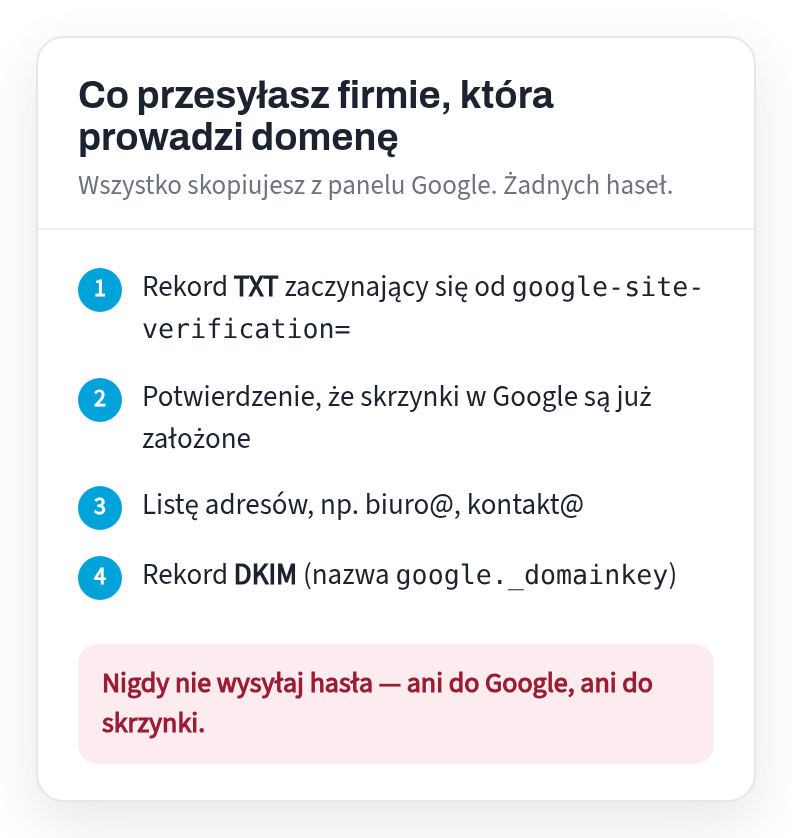
Is the domain with us? Reply to our last letter and include these four things. MX, SPF and checking that the mail arrives are set by ourselves.
Without Workspace?
You can send as office@ from regular Gmail - ”Business email in Gmail“, and read the mailbox on the phone - ”OVH Mail on your phone without Gmail”.
Is the domain with us? Just write back with your records
Reply to any of our letters and paste the records from the list above. We will change the domain settings on our side and let you know when the email starts going to Google.
Don't have a website or domain yet? We'll make it within 24 hours of the materials, and you pay €149 only when you decide it's OK - with the first year of domain, hosting and email included in the price.
Sources
Each fact in this text comes from one of the sites below. Laws change - if you are reading this long after the review date, please check the source.
Read also
- OVH Mail on your phone without Gmail - iPhone and AndroidHow to open your OVH company mailbox (e.g. biuro@yourcompany.example) on a phone without Gmail: shortcut in the browser, built-in Mail on iPhone or free Android application - with ready-made settings.
- Business email with OVH on Android - in the Gmail appHow to add a company mailbox from OVH (e.g. biuro@yourcompany.example) in the Gmail application on your phone so that sending goes straight through the mailbox server - with ready-made IMAP and SMTP settings.
- Werkspot: how much does one job really cost?You pay from €3 to €96 for contacting a customer - even if you don't receive the order. How to calculate the cost of one Werkspot order and how to make the next one come free of charge.
- Privacy policy on the website of a company in the Netherlands - what must be thereEven a regular contact form collects personal data, and Dutch law (AVG) then requires you to tell us what happens to it. What needs to be on the Privacy page and when you really need cookie consent.
- Website in Polish or Dutch - who is your company for?Polish clients, Dutch clients, or both? This determines what language the website should be in. We show you how to decide and what the bilingual version offers.
- Subscription website - how much will you really payA website “for €0” and then a permanent subscription fee for its maintenance. We show you how much it really costs for one, three and five years and what three questions to ask before signing.
- Business email in Gmail without Workspace - sending from your own domainDo you have a business address on your own domain and write from your private Gmail? Three steps to send as office@ - without paid Google Workspace. With diagrams.
- What must be on the website of a company in the NetherlandsKvK, btw-id, address, telephone and privacy policy - what Dutch law requires on the company website and where to enter it. With legal basis for each point.
- Google Listing: How to Get Found Before You Have a PageA free business card on Google is the fastest way for a customer in the Netherlands to find you. What to enter, how to verify the company and what to do with opinions.
- How much does a website cost in the NetherlandsWhat really affects the price of the website, what can be saved without loss, what is not worth paying for and how much it costs us. With specific amounts.
- Why is no one calling from your side?Eight reasons why the website exists and the phone is silent. Everyone can check it themselves in a few minutes, on their own phone.
- Website or online store - what you really needA store costs several times more than a website and requires constant maintenance. When is it really needed and when is a simple website enough?
- How to get clients for renovations in the Netherlands without paying for advertisingFour places where a Polish renovation team in the Netherlands can show up for zero euros - and one where they usually waste time.
- I have a business on Facebook - do I still need a page?The Facebook page is free and fast. However, it has three limitations that no one talks about when setting up.
- How to find out whose domain it is - and get it back from the contractorHow to check who the .nl domain is registered to, and then: transfer code, five days to issue it, sample letter from SIDN - when the company that created your website stopped receiving.